

Building an AI Agent That Can Pay Its Own API Bills
Most agents silently fail when they hit a 402. Here's how to build one that detects the error, pays the API autonomously with USDC, and keeps going — using @abstraxn/agent-kit.
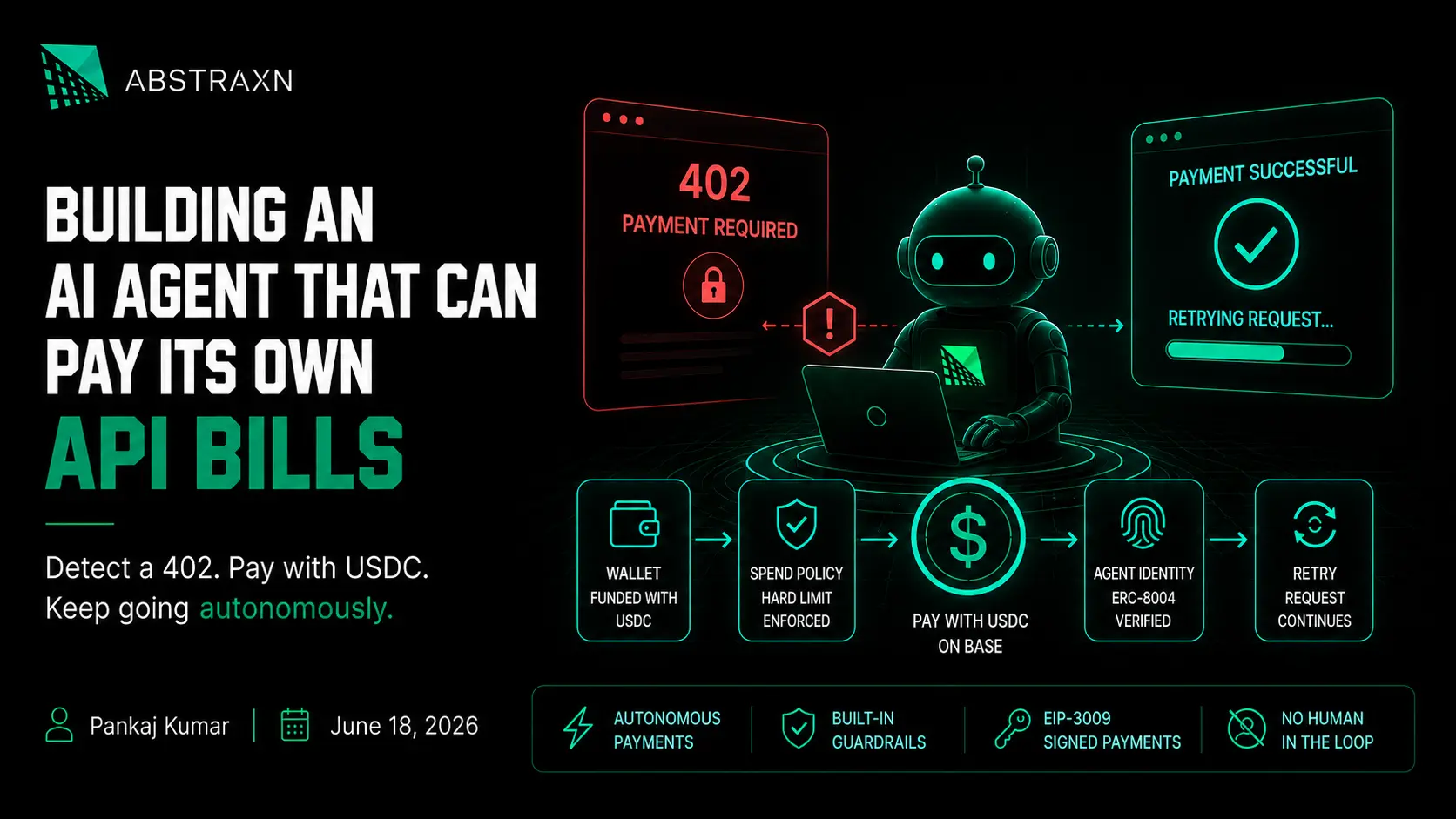
Most developers handle a 402 in an agentic context one of two ways. They catch it, log it, and surface it to a human — which defeats the point of an autonomous agent. Or they swallow it silently, the task fails halfway through, and nobody notices until the output is wrong.
There's a third option. The agent detects the 402, pays the API, and retries — automatically, within a budget you set in advance. No human in the loop. No task failure. No silent corruption.
That's what this post builds. By the end you'll have a research agent that calls a paywalled market data feed, handles the 402 without interruption, and is capped by a hard daily spend limit so it can't go rogue.
If you haven't read "HTTP 402 Payment Required: What It Means, How to Fix It, and Why It's Suddenly Relevant Again" — start there. This post assumes you know what 402 is and why x402 exists. What it covers is how to implement the payment side using @abstraxn/agent-kit.
The short version: An agent that can't pay its own API bills is a liability. An agent that can pay without guardrails is a different liability. This post shows you both — the payment flow and the spend controls — using real SDK code.
What the Agent Needs to Handle 402 Autonomously
Before any code, it's worth being clear about what "autonomous payment" actually requires. It's not just a wallet.
A wallet gives the agent an address to hold funds. But to pay a 402 autonomously, the agent also needs:
A signing key it controls. The wallet address is public. The signing key is what authorises transactions from it. Abstraxn provisions a P-256 access key pair when you create a server wallet — the agent uses this key to sign every payment. It never leaves your backend.
A funded balance. The agent pays in USDC on Base (or whichever chain you configure). USDC is a stablecoin — $1 of USDC is $1, no price volatility to worry about. You fund the wallet address once; the agent draws down from it as it pays APIs.
A spend policy. This is the part most implementations skip, and it's the part that matters most. An agent with a wallet and no spending limits will keep paying until the wallet is empty — or until a bug in your prompt sends it into a loop. hardBlock: true in the spend policy means the agent hits a wall at $5/day (or whatever you set) and stops. Not advisory. Hard stop.
On-chain identity. The x402 protocol uses ERC-8004 agent identity to verify that the payment came from a registered, accountable agent — not an anonymous address. Identity registration is a separate step after wallet funding — the SDK's registerAgentIdentity() call handles it, but it requires the wallet to hold gas on the target chain first. Step 2 covers what to fund and when.
Those four things together are what makes autonomous 402 handling safe to deploy. The SDK wires all of them up in sequence.
Step 1: Install and Initialise
npm install @abstraxn/agent-kitNode.js 18 or higher. You'll need an API key from the Abstraxn Dashboard.
import { AgentKitClient } from '@abstraxn/agent-kit';

const agentKit = new AgentKitClient({
  apiKey: process.env.ABSTRAXN_API_KEY!,
  wallet: 'server', // auto-provisions an Abstraxn server wallet
});
The wallet: 'server' option tells the SDK to provision a server wallet — Abstraxn generates the key pair, creates the smart account, and returns the EVM address and access key. You don't manage key generation. You store the result.
Step 2: Create the Agent and Provision Its Wallet
This runs once per agent — typically at user onboarding or agent setup time. Not on every request.
const { agent, wallet } = await agentKit.createAgent({
  name: 'Market Data Research Agent',
  description: 'Fetches paywalled financial data feeds autonomously',
  userIdentity: '[email protected]',
  userEmail: '[email protected]',
});

// Store all of this in your database immediately.
// wallet.accessKey CANNOT be retrieved again after this call.
await saveToDatabase({
  agentId: agent.id,
  accessKey: wallet.accessKey!,   // encrypt at rest — this signs every transaction
  evmAddress: wallet.evmAddress,
  organizationId: wallet.organizationId,
});

console.log('Agent wallet address:', wallet.evmAddress);
// Fund this address with USDC on your target chain before the agent calls any x402 API
The wallet.accessKey warning is worth taking seriously. This is the only way to sign transactions for this wallet. Abstraxn doesn't store it. If you lose it, the funds in that wallet are inaccessible. Encrypt it at rest — AES-256, KMS, whatever your stack already uses for secrets — and treat it like a private key.
After this call, send some USDC to wallet.evmAddress on your target chain. $20–50 is enough to start with for a development agent. The spend policy you set in the next step ensures it won't spend more than you allow per day regardless.
Step 3: Set the Spend Policy
This is the step most tutorials skip. Don't skip it.
await agentKit.updateSpendPolicy(agent.id, {
  enabled: true,
  budgetUsd: '5.00',  // $5 per day maximum
  period: 'daily',
  hardBlock: true,    // hard stop — not advisory
});
hardBlock: true means when the agent hits $5 of x402 payments in a day, it stops. The API returns an error. The agent doesn't pay again until the period resets. This is enforced server-side — the agent cannot bypass it, even if the prompt instructs it to.
One scope note worth knowing: the SDK documentation describes spend policy as controlling "paid MCP tool budgets (x402)." If your agent makes raw fetch() calls to external x402 APIs directly from your application code (as in Step 5 below), those calls may not be tracked by this policy. Spend policy is a hard guardrail on MCP-routed payments; application-level HTTP payment guardrails are your responsibility in code.
hardBlock: false is advisory only — you'd get a warning in the logs but the agent keeps spending. That's useful for monitoring during development. For production, use true.
The $5 figure is illustrative. Set it based on what you'd be comfortable with if the agent ran in a loop for 24 hours. For a research agent calling a market data feed, $5–$10/day is usually sufficient. For a high-frequency trading agent, recalibrate accordingly.
Step 4: Add Interaction Guardrails (Optional but Recommended)
Spend policy controls how much the agent can spend. Interaction policy controls what it can do. For a research agent that should only be reading data — never sending tokens to arbitrary addresses — add a recipient guardrail:
await agentKit.createInteractionPolicy(agent.id, {
  name: 'research-agent-guardrails',
  enabled: true,
  hardBlock: true,
  rules: {
    // Cap individual native token transfers at 0.01 ETH
    nativeAmountLimits: [{
      chain: 'base',
      max: '0.01',
    }],
    // Only allow USDC contract interactions
    contractWhitelist: [{
      chain: 'base',
      addresses: ['0x833589fCD6eDb6E08f4c7C32D4f71b54bdA02913'], // USDC on Base
    }],
  },
});
A research agent shouldn't be interacting with arbitrary contracts. Whitelisting USDC on Base means it can pay data providers and nothing else. If a compromised prompt tries to redirect funds elsewhere through an MCP tool call, the interaction policy blocks it server-side before the transaction is broadcast.
Scope note: Interaction policies enforce rules on MCP tool calls — they don't intercept raw fetch() calls your application code makes directly. For application-level x402 payments (Step 5), your own code is the guardrail. The pattern in Step 5 includes explicit payment validation for that reason.
Step 5: The Payment Flow (x402 v2)
Most production x402 APIs today use the v2 HTTP transport. It's different from what many early tutorials describe — and the difference matters. If you implement the wrong flow, you'll get a 402 on retry with a confusing error, because the API is looking for a header that doesn't exist in the simplified version.
Here's how x402 v2 actually works:
- GET the API → receive
402+PAYMENT-REQUIREDheader (base64-encoded JSON; some providers send it lowercase aspayment-required) - Decode the header → find the
accepts[]array, pick the entry matching your chain (e.g.eip155:8453for Base) - Sign an EIP-3009
TransferWithAuthorizationfor USDC using EIP-712 typed data — the agent signs, a facilitator broadcasts - Retry the original request with a
PAYMENT-SIGNATUREheader containing the full signed payload (base64-encoded) - API verifies via facilitator → returns
200with data
The key distinction from the simplified flow: the agent signs a USDC transfer authorisation, it doesn't broadcast a raw transaction. The facilitator handles broadcast. Your wallet still needs USDC — but gas is often covered by the facilitator depending on the provider.
Two details that will catch you if you get them wrong, both fixed in the code below: the signature must be EIP-712 signTypedData against USDC's TransferWithAuthorization domain (not a plain signMessage over JSON), and the nonce must be a 32-byte hex value (not a UUID). The PAYMENT-SIGNATURE payload also has to carry x402Version, the resource, and the full accepted entry — a facilitator will reject a payload missing any of them.
Legacy note: Some older or Abstraxn-simplified integrations use
X-Payment(notPAYMENT-REQUIRED) and expect an on-chain tx hash on retry viaX-Payment-Transaction. If you're working with a specific provider, check their docs for which header format they use. The code below targets x402 v2.
Before running this against a live API, make sure wallet.evmAddress holds USDC on your target chain. A wallet with 0 USDC will get a valid 402 on the first call, construct the payment signature, and then fail on the facilitator side — the retry will still return 402. Fund first, then test.
For a real x402 v2 endpoint to test against, the x402-gateway crypto price API returns live market data behind a per-request USDC payment. Hit it once with a plain GET and you'll see the 402 and the payment-required header it expects you to respond to.
import { AgentKitClient, AgentKitError } from '@abstraxn/agent-kit';
import { randomBytes } from 'node:crypto';

const agentKit = new AgentKitClient({
  apiKey: process.env.ABSTRAXN_API_KEY!,
});

// x402 v2 payment requirement shape (decoded from the PAYMENT-REQUIRED header)
interface X402Accept {
  scheme: string;       // 'exact'
  network: string;      // 'eip155:8453' (Base), 'eip155:84532' (Base Sepolia), etc.
  payTo: string;        // recipient address
  amount: string;       // amount in token base units (USDC has 6 decimals)
  asset: string;        // USDC contract address — used as the EIP-712 verifyingContract
  maxTimeoutSeconds: number;
  resource?: string;    // the resource being paid for
  extra?: {             // chain/token-specific EIP-712 domain overrides
    name?: string;
    version?: string;
    assetTransferMethod?: string;
  };
}

interface X402PaymentRequired {
  x402Version: number;
  accepts: X402Accept[];
  resource?: { url: string; [key: string]: unknown };
}

async function fetchMarketData(
  apiUrl: string,
  agentRecord: {
    agentId: string;
    accessKey: string;
    evmAddress: string;
    organizationId: string;
    userIdentity: string;
  }
) {
  // ── First attempt — no payment header ──
  const response = await fetch(apiUrl);

  if (response.status !== 402) {
    return response.json();
  }

  // ── 402 received — decode the payment requirement ──
  // Header case varies by provider: some send PAYMENT-REQUIRED, some payment-required
  const rawHeader =
    response.headers.get('PAYMENT-REQUIRED') ??
    response.headers.get('payment-required');

  if (!rawHeader) {
    // Legacy fallback — older integrations use X-Payment + on-chain tx hash retry
    const legacyHeader =
      response.headers.get('X-Payment') ?? response.headers.get('x-payment');
    if (!legacyHeader) {
      throw new Error(
        '402 received but no PAYMENT-REQUIRED or X-Payment header found. ' +
        'Check the API provider docs for their x402 header format.'
      );
    }
    throw new Error('Legacy X-Payment flow detected — see your provider docs.');
  }

  const paymentRequired: X402PaymentRequired = JSON.parse(
    Buffer.from(rawHeader, 'base64').toString('utf-8')
  );

  // Pick the payment option matching your chain
  const targetNetwork = `eip155:${process.env.CHAIN_ID}`; // e.g. 'eip155:8453' for Base
  const accept = paymentRequired.accepts.find((a) => a.network === targetNetwork);

  if (!accept) {
    throw new Error(
      `No payment option for network ${targetNetwork}. ` +
      `API accepts: ${paymentRequired.accepts.map((a) => a.network).join(', ')}`
    );
  }

  // ── Authenticate the server signer ──
  const signer = agentKit.getServerSigner();
  await signer.authenticate({
    userIdentity: agentRecord.userIdentity,
    accessKey: agentRecord.accessKey,
  });

  const client = signer.createPublicClient({
    rpcUrl: process.env.RPC_URL!,
    chainId: Number(process.env.CHAIN_ID!),
    organizationId: agentRecord.organizationId,
    fromAddress: agentRecord.evmAddress as `0x${string}`,
  });

  // ── Build the EIP-3009 TransferWithAuthorization message ──
  const validAfter = Math.floor(Date.now() / 1000);
  const validBefore = validAfter + accept.maxTimeoutSeconds;
  // EIP-3009 requires a bytes32 nonce — NOT a UUID string
  const nonce = `0x${randomBytes(32).toString('hex')}` as `0x${string}`;

  // Values are strings, not BigInt — the signer and JSON transport both expect strings
  const authorization = {
    from: agentRecord.evmAddress as `0x${string}`,
    to: accept.payTo as `0x${string}`,
    value: accept.amount,              // e.g. "1000" (USDC base units), already a string
    validAfter: validAfter.toString(),
    validBefore: validBefore.toString(),
    nonce,
  };

  // ── Sign with EIP-712 typed data — the USDC TransferWithAuthorization domain ──
  // This is the critical part. USDC payments require signTypedData against the
  // token's EIP-712 domain, not a plain signMessage over JSON.
  // The domain name/version can be overridden per-chain via accept.extra.
  const signature = await client.signTypedData({
    typedData: {
      domain: {
        name: accept.extra?.name ?? 'USD Coin',
        version: accept.extra?.version ?? '2',
        chainId: Number(process.env.CHAIN_ID!),
        verifyingContract: accept.asset as `0x${string}`, // USDC contract address
      },
      primaryType: 'TransferWithAuthorization',
      types: {
        EIP712Domain: [
          { name: 'name', type: 'string' },
          { name: 'version', type: 'string' },
          { name: 'chainId', type: 'uint256' },
          { name: 'verifyingContract', type: 'address' },
        ],
        TransferWithAuthorization: [
          { name: 'from', type: 'address' },
          { name: 'to', type: 'address' },
          { name: 'value', type: 'uint256' },
          { name: 'validAfter', type: 'uint256' },
          { name: 'validBefore', type: 'uint256' },
          { name: 'nonce', type: 'bytes32' },
        ],
      },
      message: authorization,
    },
  });

  // ── Build the PAYMENT-SIGNATURE payload (full x402 v2 shape) ──
  // The facilitator rejects payloads missing x402Version, resource, or accepted.
  const paymentSignaturePayload = Buffer.from(
    JSON.stringify({
      x402Version: paymentRequired.x402Version ?? 2,
      resource: paymentRequired.resource ?? { url: apiUrl },
      accepted: accept, // the full accept entry you selected, echoed back
      payload: {
        signature,
        authorization, // already string-encoded — no BigInt conversion needed
      },
    })
  ).toString('base64');

  // ── Retry with payment proof ──
  const retryResponse = await fetch(apiUrl, {
    headers: {
      'PAYMENT-SIGNATURE': paymentSignaturePayload,
    },
  });

  if (!retryResponse.ok) {
    throw new Error(
      `Payment retry failed: ${retryResponse.status} — ` +
      `check USDC balance at ${agentRecord.evmAddress} and verify chain matches ${targetNetwork}`
    );
  }

  return retryResponse.json();
}
The function is the same shape as before from the caller's perspective — pass a URL, get data back. The 402 handling is internal. The two places most developers trip up: forgetting to fund the wallet with USDC before the first call (zero balance → facilitator rejects → second 402), and mismatching the CHAIN_ID env var with what the API's accepts[] array actually lists.
One more EIP-712 gotcha: the USDC domain defaults to name: 'USD Coin' and version: '2', which is correct for native USDC on Base and most chains. Bridged USDC (USDC.e) or other chains can use a different name or version. The code above reads accept.extra?.name and accept.extra?.version first and only falls back to the defaults — so a well-formed x402 v2 response carries the right domain values for you. If a provider omits extra and you're on a non-standard token, a domain mismatch produces a signature the facilitator silently rejects, so verify against the token contract's EIP712Domain if a funded, correct-chain retry still fails.
Set CHAIN_ID=8453 for Base mainnet, CHAIN_ID=84532 for Base Sepolia (testnet). Set RPC_URL to a Base RPC endpoint — Alchemy, Infura, or the public https://mainnet.base.org.
That's the full loop. The caller doesn't need to know a payment happened — it just gets the data.
Step 6: Putting It Together — Full Agent Service
Here's what the complete backend service looks like when you wire all the steps together:
import { AgentKitClient, UnauthorizedError, AgentKitError } from '@abstraxn/agent-kit';

const agentKit = new AgentKitClient({
  apiKey: process.env.ABSTRAXN_API_KEY!,
});

// ── Run once at setup ──

async function setupResearchAgent(userEmail: string) {
  const { agent, wallet } = await agentKit.createAgent({
    name: 'Market Data Research Agent',
    description: 'Fetches paywalled financial data autonomously',
    userIdentity: userEmail,
    userEmail,
  });

  // Set daily spend cap — hard stop at $5
  await agentKit.updateSpendPolicy(agent.id, {
    enabled: true,
    budgetUsd: '5.00',
    period: 'daily',
    hardBlock: true,
  });

  // Restrict to USDC interactions on Base only
  await agentKit.createInteractionPolicy(agent.id, {
    name: 'research-guardrails',
    enabled: true,
    hardBlock: true,
    rules: {
      contractWhitelist: [{
        chain: 'base',
        addresses: ['0x833589fCD6eDb6E08f4c7C32D4f71b54bdA02913'],
      }],
    },
  });

  // Store securely — accessKey cannot be retrieved again
  return {
    agentId: agent.id,
    accessKey: wallet.accessKey!,
    evmAddress: wallet.evmAddress,
    organizationId: wallet.organizationId,
  };
}

// ── Runs on every research task ──

async function runResearchTask(
  agentRecord: Awaited<ReturnType<typeof setupResearchAgent>> & { userIdentity: string },
  dataFeedUrl: string,
) {
  try {
    const data = await fetchMarketData(dataFeedUrl, agentRecord);
    return { success: true, data };
  } catch (error) {
    if (error instanceof UnauthorizedError) {
      console.error('Agent access key invalid or expired');
    } else if (error instanceof AgentKitError) {
      // Spend policy hit — budget exhausted for today
      if (error.code === 'SPEND_POLICY_EXCEEDED') {
        console.error('Daily spend limit reached — agent paused until reset');
      }
    }
    throw error;
  }
}
The spend policy error is worth handling explicitly. When hardBlock: true kicks in, the SDK throws with a recognisable error code. Catch it, log it, and alert whoever owns the agent — without the task silently failing or the agent trying to route around the limit.
What You've Built
Take a second to look at what this agent can now do.
It calls a paywalled market data API. When the API returns 402, the agent decodes the payment requirement, signs a USDC TransferWithAuthorization using its server-side signing key, and retries with the signature attached — in the same request cycle. A facilitator verifies and settles the payment on-chain. The calling code sees a data response. It never sees the 402.
The spend policy means it can do this up to $5/day. After that, it stops and surfaces an error you can act on. The interaction policy adds a second layer on MCP tool calls — whitelisting USDC on Base so a compromised prompt can't redirect funds through Abstraxn's MCP layer. Raw fetch() payments in Step 5 rely on your application code for validation.
An autonomous agent that can't pay for the resources it needs will always require human babysitting. One that can pay, within enforced limits, is infrastructure you can actually trust to run overnight.
This is what "agentic economy" means in practice — not agents that browse the web and write emails, but agents that operate as economic actors with their own resources, their own spending authority, and hard constraints on how far that authority extends.
Start building: Get your API key from the Abstraxn Dashboard and install
@abstraxn/agent-kit. The setup flow above takes under 30 minutes to run end to end.
The Takeaway You Can Repeat at a Meetup
An agent that handles 402 by surfacing it to a human isn't autonomous — it's a chatbot with extra steps. The pattern here is different: provision the wallet once, set the spend cap, and let the agent treat paywalled APIs the same way it treats any other dependency. The 402 becomes an implementation detail, not a blocker. That's the shift from "AI assistant" to "AI agent."
Key Takeaways
- Autonomous 402 handling requires four things: a signing key, a funded USDC wallet, a spend policy, and on-chain identity. Miss any one and the pattern breaks.
wallet.accessKeycannot be retrieved after creation. Encrypt it at rest immediately. Treat it exactly like a private key.hardBlock: trueis not optional in production. An agent with a wallet and no spend cap will keep paying until the balance is zero. A hard block is the responsible default.- Spend policy and interaction policies apply to MCP-routed payments, not raw
fetch()calls in your application code. Application-level x402 guardrails are your responsibility — the error handling in Step 5 is that guardrail. - Most production x402 APIs use v2 transport:
PAYMENT-REQUIREDheader on 402, EIP-3009 signature,PAYMENT-SIGNATUREheader on retry. The legacyX-Payment/ tx hash flow still exists but is not the current standard. - Zero USDC = second 402. Fund the wallet before testing. The payment signature will be constructed successfully, but the facilitator will reject an authorisation with no balance to back it.
- Spend policy errors should be caught explicitly. When the daily budget is exhausted, the SDK throws with a recognisable error code. Handle it, log it, and alert — don't let it surface as an unhandled exception.
Frequently Asked Questions
Do I need to understand blockchain to use this? Not deeply. The essentials: USDC is a stablecoin (1 USDC = $1, no price volatility), Base is an Ethereum Layer 2 with low fees, and an EVM address is where you send funds. Your agent's wallet needs USDC to pay APIs — zero USDC means the payment signature will be constructed but the facilitator will reject it, and you'll get a second 402. In facilitated x402 flows (the v2 default), the facilitator often covers gas — but confirm with your API provider. In non-facilitated flows, your wallet also needs a small amount of ETH on Base for gas (a few cents per transaction).
What happens if the agent's wallet runs out of USDC?
In x402 v2 facilitated flows, your code will still construct a valid EIP-3009 signature, but the facilitator rejects it because there is no USDC to transfer. The retry returns 402 again — the SDK may not throw. Treat a second 402 after signing as a likely balance problem. Monitor USDC at wallet.evmAddress and set a low-balance alert before you go to production.
Can I use a wallet I already have instead of a server wallet?
Yes. Pass wallet: 'external' to AgentKitClient and provide your own evmAddress. The SDK won't generate keys or provision a wallet — you're responsible for signing transactions with your own stack. Spend policy and interaction policy features still apply.
What chains does this work on? Any chain that Abstraxn has configured for your account. Base is the default for x402 payments (low fees, USDC liquidity). Sepolia is available for testing. Check your dashboard for the full list.
What does the API provider need to support x402?
Most x402 APIs today use the v2 transport: they return 402 with a PAYMENT-REQUIRED header (base64 JSON containing an accepts[] array), and expect a PAYMENT-SIGNATURE header on retry with the signed EIP-3009 payload. Some older or provider-specific integrations use X-Payment with an on-chain tx hash instead. Check your provider's docs for which format they use — the two are not interchangeable.
Is the access key the same as a private key? Functionally yes — it's the credential that authorises transactions from the agent's wallet. The difference is that it's a P-256 key pair rather than secp256k1 (Ethereum's standard curve), and signing happens server-side through Abstraxn's signing infrastructure rather than directly in your code.
About the Author

Pankaj Kumar
Software Engineer
Pankaj Kumar is a software engineer at Abstraxn, where he works on the infrastructure that lets AI agents authenticate, pay, and transact without human intervention. Before Abstraxn, he spent five years building payment systems and developer tooling. He writes about account abstraction, on-chain payments, and what it actually takes to make autonomous systems work reliably.